Disclaimer: I received a complimentary copy of Paku Pro’s tier in exchange for providing a review and feedback to Paku’s developer. However, my below review is my 100% honest, unbiased review.
I used the Davis AirLink air quality monitors for years to monitor air quality at my house. Now that I am no longer working with AEM/Earth Networks/Davis Instruments, I could no longer keep my Davis AirLinks online. Providentially, a while back I picked up a PurpleAir air quality monitor. I wanted to feed the data from it into the EPA’s air quality maps, BreezoMeter’s feed, and Wunderground, and I also wanted to compare the data with my Davis AirLink. I’m now down to solely using the PurpleAir to monitor my local air quality, and it is the only air quality sensor I personally recommend. I prefer it over the Davis AirLink since I love the ability of it to light up various colors to show me at a glance if my air quality is good or poor.
While I love my PurpleAir sensor (and it provides a highly accurate way to track air quality readings at my house), my only “disappointment” with it has been the lack of a dedicated iPhone and iPad app to use it. For a little bit, I had bookmarked the PurpleAir Map on my iPhone and iPad as a “web app”. It was decent at providing current air quality readings and an air quality graph, but I wanted a little more functionality.
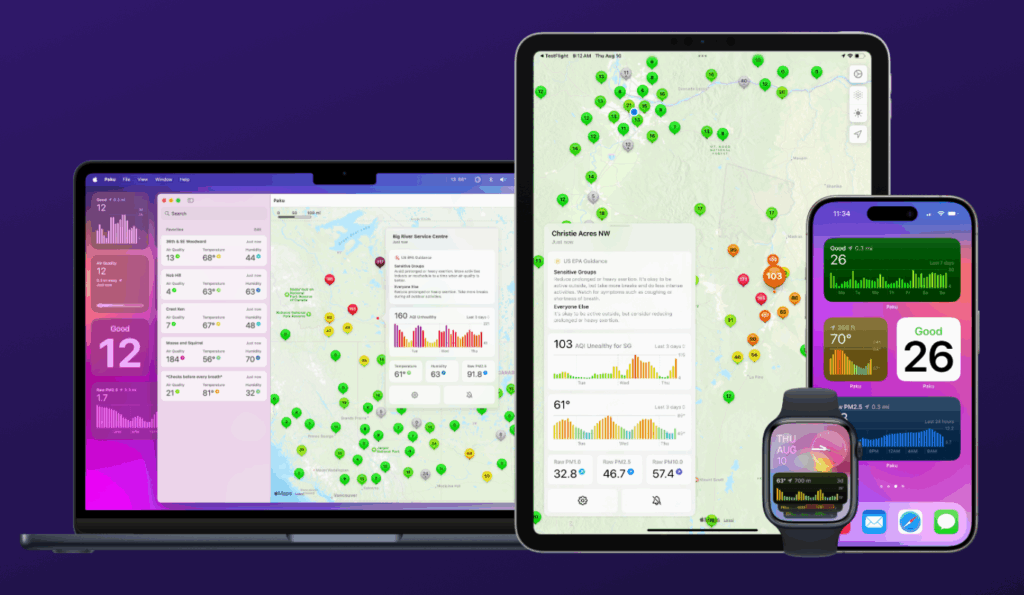
I discovered the Paku app. It has truly, as the developer claims, to be a “breath of fresh air” for using my PurpleAir. The app is beautifully designed and feels 100% like an Apple-designed air quality app. It runs seamlessly across my iPhone and iPad, and as a bonus, it also runs great on my Apple Watch and even my Mac, so I can easily monitor my PurpleAir anywhere. You don’t even need a PurpleAir to use the app (you can simply browse other PurpleAir devices using the app), but the developer will give you a discount code if you want to order a PurpleAir, and having your own PurpleAir enhances the fun of using the app. The app uses Apple Maps to display the data, loads instantly, and keeps up-to-date with Apple’s design principles (it’s fully optimized for the 26 operating system upgrades).
I love how you can tap on a PurpleAir sensor and instantly see a graph of past data, as well as you can build a mini “dashboard” drilling down the readings of the various on-board sensors (PM 1.0, PM 2.5, PM 10.0, VOCs, Temperature, and Humidity). The only thing I’d like to see added to this is the high air quality reading for the day and what time the high was reached. I had this with the AirLink and could benefit from this.
The Paku app does offer some gorgeous and super-readable widgets. I have pinned the current air quality and chart to my iPhone home and iPhone and iPad’s lock screens, the air quality chart on my Apple Watch so I can even track air quality from my watch, and I have the large widget pinned to my Mac’s desktop and iPad’s home screen. This way, no matter what device I am on, I can quickly check my air quality, even without opening the app.
My favorite feature of the app is the push alerts feature. I can set the app to alert me when my PurpleAir sensor reaches a certain air quality threshold (for example, 100), so I no longer have to keep manually checking to see if the air quality becomes super-unhealthy. I’ll instantly know it. This is a major improvement over the email alerts from the Davis AirLink, which didn’t always function reliably. The one feature I’d like to see added to Paku is the ability to have location-based air quality alerts from the nearest sensor. That would be super-useful when traveling.
The Paku app can support private sensors as well, great for indoor PurpleAir devices, and it can also display the EPA’s AirNow sensors on the map, so no need for a separate app. Some of the features will require a PurpleAir Pro subscription, but the developer provides affordable monthly, annual, or even a lifetime subscription. One feature that might be fun for Pro subscribers in the future would be the ability to also pull in BreezoMeter’s feed (so people wouldn’t need to consult Apple Weather or Google Maps for this feed now that BreezoMeter dropped their dedicated mobile app).
The Paku app is the only air quality app I am using to monitor my PurpleAir at my house and monitor my air quality on the go. I highly recommend downloading it today. You will find it to truly be a “breath of fresh air” when monitoring local air quality.
A few updates:
- If any of my readers need Logos Bible Software, I now have a referral link where you can try a free trial of it and receive a discount on it. I wanted the opportunity to extend this to my readers.
- I have been chosen to be a host site for a weather camera and a weather station. For those of you who have missed my weather camera, it will be returning soon! You will be able to watch it live here on the Arkansas Weather Watchers

